3.24 - August 2026
Please note that this is not a complete changelog: the complete changelog can always be found in BISO in the user menu under “Changelog”.
This update brings improvements to the daily workflow: faster access to recently edited cases, a revised appointment postponement/cancellation, pending tasks for several people at once, documents directly on the institution master data, as well as numerous extensions to exports and translations. SMS sending now supports several templates, in the letter templates section instead of the previous parameters.
Single sign-on via OpenID Connect (OIDC), including automatic user provisioning, is now also available.
In addition, the technical foundation was modernised (ExtJS 8, new SMS providers, new Word-to-PDF converter).
Please note the “Technical changes” (“Technische Änderungen”) section further below: this release contains changes that require attention during the update.
New features
Recently opened cases
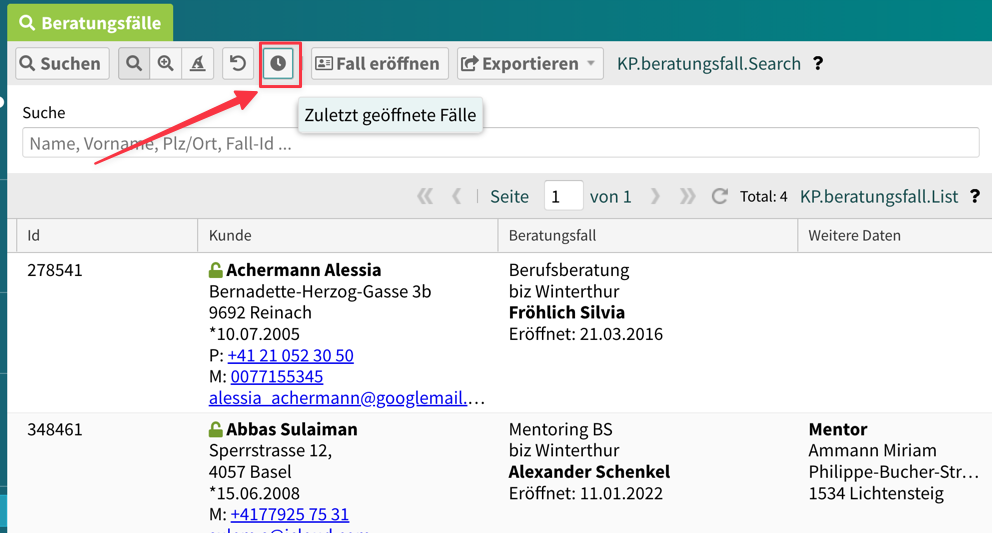
The counselling case search now has a “Recently opened cases” (“Zuletzt geöffnete Fälle”) button available: it lets you find the cases you recently created or edited, without any search criteria. (#32142)
Appointment postponement / cancellation: revised form
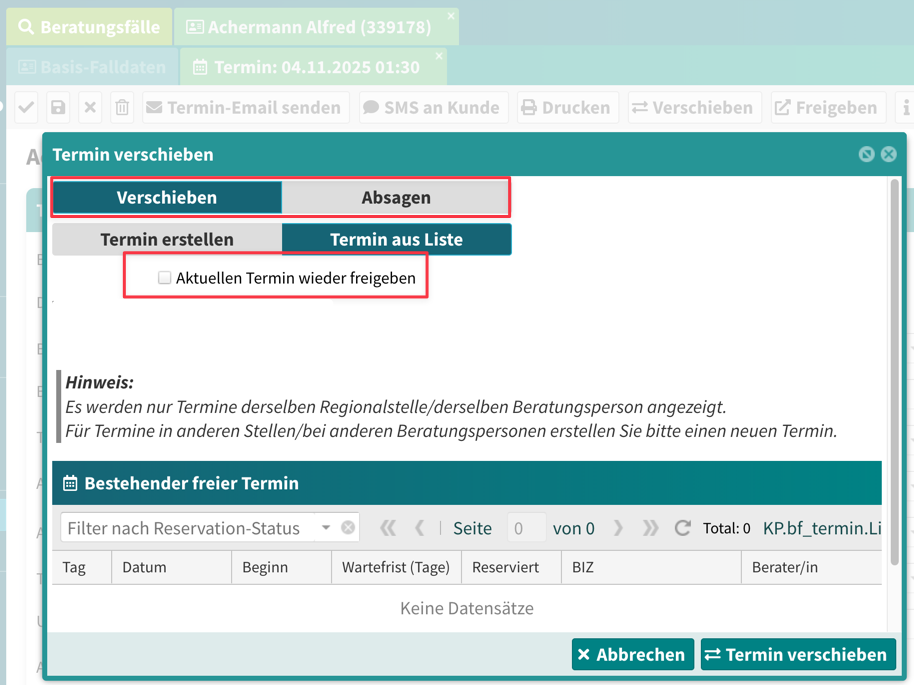
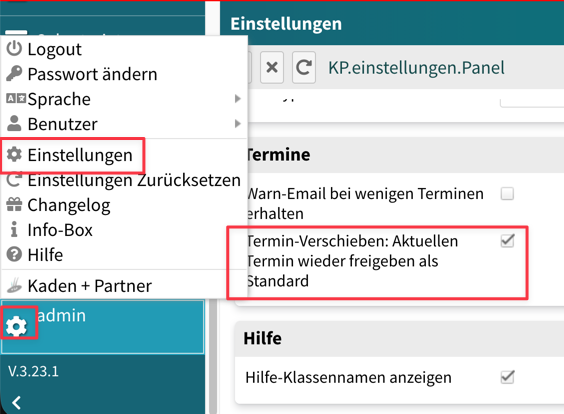
The form for postponing an appointment has been revised and extended with the “Cancel appointment” (“Termin absagen”) function: a cancellation reason can now be recorded and, optionally, a replacement appointment can be booked directly. Whether the previous appointment is released again by default can be set in the user settings. (#31663)
Create pending tasks for several people at once
A pending task can now be created in one step for several users at the same time - a separate pending task is created for each selected user. This is useful for secretarial staff, to create/distribute pending tasks at the same time. (#31662)
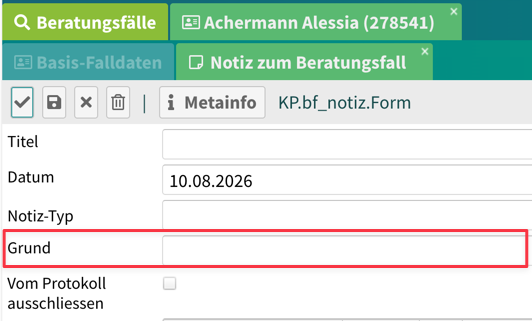
Note: new free-text field “Reason” (“Grund”)
Notes can now be given a free-text field “Reason”. The field is activated via the
parameter mit_bf_notiz_grund and can therefore be enabled on a customer-specific basis.
(#32251)
Home page: freely adjustable list height
The height of the lists on the home page (home panel) can now be adjusted by mouse drag and saved permanently in the settings (handle at the edge of the list). In addition, more entries are loaded per list. (#31936, #32091)
Single sign-on via OpenID Connect (OIDC)
The user auto-provisioning announced in version 3.23 is now available via the standard OpenID Connect (OIDC): an external identity provider authenticates the user. Customer-specific implementations such as “auto-provisioning” are possible:
BISO automatically creates the user on first login and synchronises them on every further login (identity, groups, roles and permissions). A separate BISO login screen is no longer needed. The implementation is built as a general framework and is made concrete per customer via its own class - the specific form must be agreed with IT in each case.
(#31382)
SMS sending: new SMS providers
SMS sending now supports several providers: the previous email-based sending, the Swisscom SMS REST API, and aspsms. The change is backwards-compatible - existing installations continue to run unchanged without configuration changes. (#31889)
SMS templates instead of fixed parameters
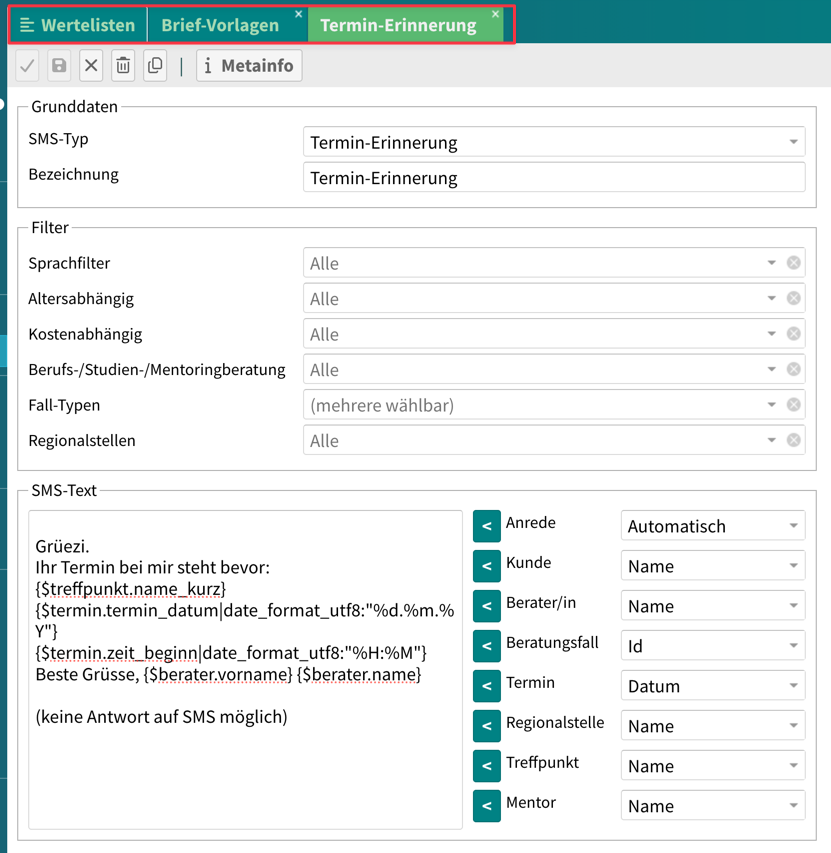
SMS texts are now maintained as their own template type in the value lists under “Letter templates” (“Brief-Vorlagen”) (button “New” (“Neu”) → “SMS template” (“SMS-Vorlage”)). This means several texts are possible per use case - appointment reminder, workshop reminder and info SMS during letter creation - instead of exactly one as before. Each SMS template can be restricted by language, age, chargeability, counselling type, case type and regional office; when sending, BISO automatically selects the best-matching template and still sends exactly one SMS. The template used is recorded in the case log. The texts offer the same placeholders as the email templates; rendering always uses the language of the recipient.
The previous parameters for the SMS texts are discontinued - see the “Technical changes” section further below for details. (#32109)
Admin tools: force case closure and logging in the case log
Administrators now have the “Force case closure” (“Fall-Abschluss erzwingen”) action available. All actions carried out via the admin tools are now recorded in the case log (history) and are therefore traceable. (#31660)
Workshops: fully booked appointments are marked
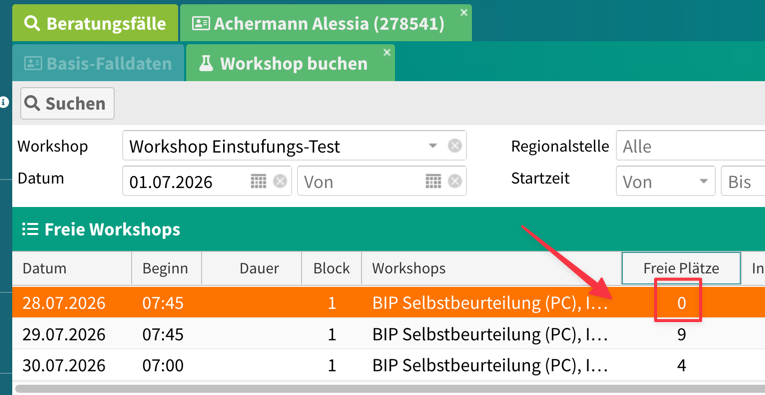
In workshop booking, fully booked entries are highlighted in colour, and the number of free places is shown directly in the list. The date filters have been arranged more compactly. (#32032)
Documents and emails in English
Letter and document templates can now be set to English: the “Letter language” (“Briefsprache”) / “Language” (“Sprache”) field now also offers English in addition to German and French. The letter templates then support English date formats (e.g. weekdays in English). For the canton of Thurgau, an English template for the invitation letter is provided as an example. (#32154)
French translations: exports and user interface
A focus of this release: numerous exports and forms are now fully available in two languages (German / French):
- History export (#32095)
- Person and institution exports (#32096)
- Workshop exports, including a French version and appointment export for room booking (#32027)
- Field “Target group” (“Zielgruppe”) (#32029)
- Journal and TinyMCE editor (#32125)
- Pending tasks (#31883)
- Exports in general: columns are now output via the display name and the translation (#32183)
- Appointment confirmation: field “Created by user” (“erstellt durch Benutzer”) (#32184)
- Various other French translations (#31784, #32113, #32115)
Other new features
- Documents on institutions: the institution master data now has a “Documents” (“Dokumente”) tab available. Files can be uploaded and managed directly on the institution there - similar to the documents on person and counselling case. (#32327)
- Documents: “Confirmation” tab can be enabled: the “Confirmation” (“Bestätigung”) tab in the documents area of the
counselling case can now be shown or hidden via the parameter
mit_dokument_bestaetigung. (#28815) - Case list: “Last changed” column: in the case overview and the case search, the “Last changed” (“Zuletzt geändert”) column can now be shown. (#32248)
- Case exports with current case phase: the case exports now include the current case phase. (#32244)
- Workshop exports with number of participants: the number of participants is shown in the PDF and CSV export, with consistent column naming. (#32028)
- Letter templates: more variables in the email dialog: an extended selection of template variables is
available in the email dialog of the letter templates. (#32068)
- Secondary case types: the parameter
mit_bf_typenwas renamed tomit_sekundaeren_falltypen, and the label in the user interface was standardised accordingly. (#31895) - Renaming of KBSB19 to SK BSLB: the statistic / report “KBSB19” is now called “SK BSLB”, including translations, template and documentation. (#31834)
- Pending tasks: limit increased to 100: up to 100 pending tasks are now shown instead of the previous
- (#32246)
- Workshop planning: several regional offices per plan: a workshop plan can now be assigned to several regional offices. The selection of responsible persons shows the people from all selected regional offices. (#32112)
- Import inbox revised: the import inbox window responds better to smaller screens, and the window for person matching was adjusted. (#31821, #31844)
- Events: search starts automatically: when the events panel is opened, the search now runs automatically. (#32065)
- AMM report / AMM certificate for canton BL: the AMM report from Zurich was adopted for the canton of Basel-Landschaft and extended. (#32300)
- AMM certificate ZH adjusted: adjustments to the AMM certificate, correction of the venue, and extended links. (#32280)
- CMBB BL: Safelog import extended: the Safelog import was adjusted for the final migration and extended with result and attachments; a pending-task import is also available. (#31431, #32252)
- BISO SH online appointments: the data mapping for taking over online appointment requests was adjusted. (#31370)
Other minor adjustments
- Search criteria remain visible after the search: in the appointment search and in the counselling case search, the filter area no longer collapses after the search is triggered; instead, the view scrolls directly to the results list. The search criteria therefore remain accessible for adjustment. (#32328)
- List sorting is retained: the sort order chosen in a list is now saved together with the column arrangement and restored the next time it is opened.
- Geneva: address display in letter and case sheet: the address in the letter template and on the case sheet now includes PO box and country; the address block on the case sheet was made more generous. (#31711)
- Geneva: renaming “thème de rendez-vous” to “Étape”: the label was consistently adjusted. (#32230)
- Geneva: fields hidden in the simple person form: for Geneva, certain fields are no longer shown in the simple form. (#32038)
- Geneva: filter “Reservation status free appointments” (“Reservationsstatus freie Termine”) hidden: the filter is no longer shown for Geneva. (#32091)
- Geneva: user import from Excel: users can be imported and created from an Excel file based on the OIDC logic. (#32435)
- SMS sending: fallback sender: if no sender person is set, the
configured
smtp_senderaddress is now used. - Counselling case opening form: the school class logic (parameter
mit_institution_typ_schulklasse_link) was standardised. - Workshop templates (DE) were moved to the DE folder; the column width for the meeting point in the export was improved.
- Manual revised: the visual appearance of the BISO manual was adapted to the new look, the structure was revised and various chapters were added (including OIDC, Word templates, roles).
- Info box: fewer scrollbars in the info box on the home page.
Technical changes
This section is primarily intended for administrators and IT: please note these points during the update.
- Upgrade to ExtJS 8.0: the underlying UI framework was updated to the current major version. The user interface behaves unchanged - please still test the release thoroughly before the production update.
- Word-to-PDF conversion now via phpdocx: the conversion of Word documents to PDF
was rebuilt and no longer requires an MS Word / PowerShell installation. Configuration is now
done via
phpdocxConfig- seeUPGRADE.mdand the manual chapters on the Word template installation. (#31202) - OIDC can be enabled via Docker: OIDC authentication can now be enabled via the environment variable
OIDC_ENABLED(Docker / Helm chart). No OIDC authentication is deliberately performed for thebackend/apipath. - Health check route for monitoring: BISO now provides the anonymous route
GET /backend/status, which monitoring tools can use to check the availability of the application . The route responds withHTTP 200on success andHTTP 503on failure. The supplieddocker-compose.ymland the Helm chart (integration/kubernetes/helm-biso) configure a corresponding health check and liveness/readiness probes on this route. - SMS job scheduler: sending now uses the
send-smscommand instead of the deprecatedSendSMS.phpscript. - SMS texts: parameters discontinued: the six parameters for the SMS texts (
sms_versand_termin_vorlage,sms_versand_workshop_vorlage,sms_versand_einladungsbrief_vorlageand their_frvariants) are no longer available in Admin > Parameters. During the update, their content is automatically transferred to SMS templates: the German variant becomes the template without a language filter, and the_frvariant receives the French language filter. Please check the migrated templates after the update. The switchmit_sms_versand_einladungsbriefremains unchanged. (#32109) - User roles and permissions documented: the role and permission logic is now documented in the manual. The no-longer-used “Developer” (“Entwickler”) flag at the user level was removed, and the visibility of the product and module tabs was corrected.
Bug fixes
- #32141: the user interface froze during manual SMS sending to a person with no mobile number on file.
- #32139: for notes, the technical user was shown instead of the first and last name of the creator.
- #32250: note display in the history - user and type were swapped.
- #32245: incorrect popup for pending tasks already completed.
- #32176: incorrect pending tasks were shown in other case types.
- #32137: multiple selection of locations was incorrectly possible.
- #32192: error with the mailto link.
- #31900: editing report templates directly in the list (row edit) did not work correctly.
- #32183: CSRF token error when exporting case appointments.
- #32293: scrolling in the simple person form did not work correctly.
- #32288: incorrect evaluation of the workshop appointments when quick-creating a document.
- #32197: special characters caused errors during PDF generation (FOP cleanup improved).
- #32459: SMS text modules were entered in the HTML editor, which caused HTML code to end up in the SMS text. They are now edited in a plain text field; existing SMS text modules are automatically cleaned up during the update.
- #32459: the window for SMS sending was too small and the text field could not be resized in height; the button “Send SMS” (“SMS senden”) is now called “Send” (“Senden”).
- The appointment email was not sent despite the checkbox being set in the case opening wizard.
- When creating a new appointment, the data from the first appointment was applied instead of the most recently created one.
- Mentoring forms: the “Assign mentor” (“Mentor zuweisen”) button is visible directly on the case form again.
- Case list: the “Case type” (“Fall-Typ”) column showed the technical identifier instead of the label.
- The “New appointment” (“Neuer Termin”) and “New note” (“Neue Notiz”) buttons were visible by default, but without function - they are now hidden by default.
- Workshop sheets: missing time output corrected.
- Changelog window: resizing was corrected.
- German texts in the French translation file corrected.